|

|
|
1.
|
Connect the zero-gas scrubber tubing to the calibration port. |
|
2.
|
On the device touchscreen, select "Next". |
|
|
|
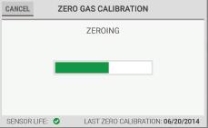
NOTE: A progress bar shows during the zero gas calibration.
|
|
|
|
3.
|
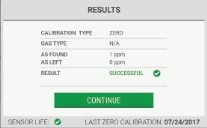
When zero gas calibration is complete, the "Results" screen shows. Select "Continue" to go to the next step. |
|
|
|
|
4.
|
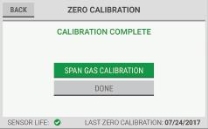
On the "Calibration Complete" screen, do one of the following: |
|
a.
|
To continue with span gas calibration, select "Span Gas Calibration". Go to Step (1) in the Span Gas Calibration section below. |
|
b.
|
To complete zero gas calibration without continuing to the span gas calibration, select "Done", and go to the next step. |
|
c.
|
To return to the "Results" screen, select "Back". |
|
|

|
|
5.
|
On the bottom of the device, install the cup on the calibration port. |
|
6.
|
Remove the tubing from the calibration port. |
|
|
|
|
7.
|
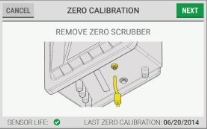
Disconnect the zero-gas scrubber tubing from the calibration port. |
|
8.
|
On the device touchscreen, select "Next". |
|